

Google should require stronger proof before adding a new customer-contact destination to a verified Business Profile. An unfamiliar messaging account attached to a business listing deserves urgent scrutiny. The business should not have to discover it in an update email and work backwards to find out who controls it.
That is the concern behind a set of Business Profile notifications supplied to us for review. They show new Messenger chat options, changed opening hours and a revised business name. The person managing the profiles disputes the changes and does not recognise the Messenger destinations as authorised business accounts.
We have removed the business’s identity from the screenshots. The notifications warrant investigation, but they do not establish who submitted the information or prove that an account was hacked. Our criticism concerns the control businesses have over changes, particularly changes to where customers are sent.
What the notifications actually show
The most concerning example is labelled “New chat option.” Under “Messenger,” the notification displays a link to a messaging account that the profile manager does not recognise.
The surrounding message says the Business Profile “has recently been updated” through user feedback or automated systems. It ends with “We’ll always double-check these details with you.”
Those words leave a business owner with an immediate question: has the new contact option already been shown to customers, or is Google waiting for approval? The screenshot does not resolve that question. Its wording describes an update that has happened.
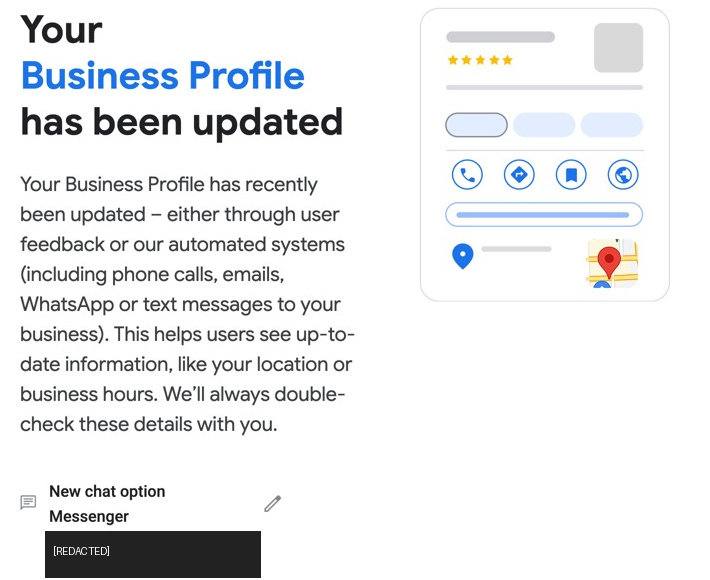
A supplied notification reports a new Messenger chat option. Identifying details have been removed. This image records the notification, not an independently verified live listing.
A separate screenshot reports another Messenger destination. The supplied hours notification replaces “Open 24 hours” throughout the week with weekday opening times and weekend closure. Another notification changes the business name by removing a location suffix.
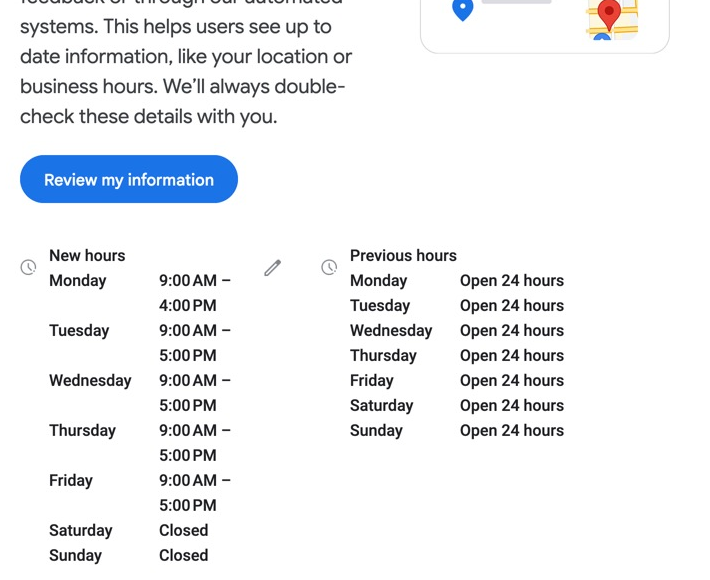
The hours shown in the notification changed substantially. The screenshot alone cannot establish which schedule correctly represents the business’s customer-facing hours.
These examples need different kinds of investigation. A revised name might be a policy correction. Hours might have been taken from an outdated page, or the previous hours might themselves need correcting. An unfamiliar chat destination requires checking who owns the receiving account before treating it as a legitimate way to contact the business.
For this article, we reviewed four relevant screenshots. The profile manager reports further examples, but we are not counting those as independently reviewed evidence. We have not authenticated the original email headers or established when the reported changes appeared publicly. Nor have we established that customers contacted the unfamiliar accounts or suffered a loss.
Can other people change your Google Business Profile?
Other people can suggest changes, and Google can update business information using sources beyond the verified owner. A suggestion is not a guaranteed edit: Google says it reviews submitted edits and may reject changes that substantially alter a business.
Google Maps’ editing documentation lists the business name, address or map location, hours, phone number and website among the details users can suggest changing. Users can also suggest changes to certain service options and features. That does not mean every field in the owner’s service catalogue is freely editable by anyone.
Google’s explanation of its information sources includes public websites, licensed third-party data, user contributions and Google’s own interactions with a business. Claiming and verifying a profile does not make the owner its sole source of information.
There is a legitimate reason for outside corrections. Customers should be able to report a closed shop, a wrong map pin or a disconnected phone number. An abandoned profile should not remain inaccurate indefinitely because its owner stopped maintaining it.
The harder question is how Google decides that an outside source is reliable enough to replace an actively managed business’s information. Owners need a useful explanation of that decision, especially when the change could redirect a customer enquiry.
Google does offer a review window, but it is not universal
Google’s current documentation says it notifies businesses about certain suggested edits before publication. Where a suggestion requires review, the owner has four days to accept or reject it. If the owner does not respond, Google may publish the change when other public information supports it, such as the business’s website. Source: Google’s update policy.
The same policy says Google may apply suggested edits without prior review when necessary to meet policy guidelines. It also warns that owners cannot manage all Google updates through their Business Profile.
It would therefore be wrong to claim Google never asks first. It would be equally wrong to tell owners that every change waits for their approval.
For a sensitive contact change, silence is weak evidence of consent. Someone may be away, handling a staffing problem or sorting through an inbox full of routine notifications. Before a new contact destination becomes public, Google should require stronger evidence that the business controls or authorises it.
Social links and chat options need separate checks
Google explicitly says some profiles can display social media links automatically. Its social-link guidance explains how owners can edit links under Edit profile → Contact → Social profiles. It also says that if Google added a link and the business still wants it removed, the owner should contact support.
That creates an unwelcome burden when the association is wrong. The business has to identify the mistake and potentially ask support to remove a link it never chose.
The Messenger examples need an additional qualification. The Google chat help page checked on 26 October 2026 describes WhatsApp and text messaging. It does not document the Messenger option shown in the supplied notifications. We cannot infer a universal Messenger rollout, or its approval process, from these screenshots.
They also do not show someone installing a software widget or malicious code. They show notifications reporting messaging links. The relevant risk is where those links send customers.
A wrong destination can cause harm without a stolen password
If a contact link sends someone to an unrelated account, the recipient could receive an enquiry intended for the business. A customer might share contact details or information about the service they need. A malicious recipient could then impersonate the business or request payment. These are potential consequences, not outcomes established in the examples above.
The distinction matters because account security and listing accuracy require different responses. Changing a password would not correct an external data source that keeps supplying a wrong contact link. Conversely, an unexpected change accompanied by an unknown account manager or suspicious sign-in needs an account-security investigation too.
Hours errors can also affect customer decisions. Someone who sees “Closed” may try another business. Someone sent to an office outside its actual opening hours may make a wasted journey. Google itself explains that business hours and addresses help it answer searches such as “open now” and “near me.” Source: business information in local search.
None of this establishes that the previous details in every disputed notification were correct. Google’s business guidelines require real-world names and regular customer-facing hours. A name correction or a change from round-the-clock availability to office hours can be legitimate. Google should make the basis for such a correction clear enough that the owner can check it.
What Google should change
Our priority would be explicit approval for a new messaging destination on an actively managed, verified profile, backed by evidence that the destination belongs to the business. A matching account name is not enough.
Owners also need notifications that distinguish a proposed change from a published one. The message should state what changed, when it became visible and the type of source Google relied on. Where possible, it should identify the public page supplying the replacement information without exposing a private contributor’s identity.
There should be a straightforward way to dispute an incorrect contact destination and prevent the same rejected association from returning without new evidence. Where Google needs to enforce a policy, it should identify the relevant rule rather than leave the owner to guess.
These are proposed safeguards. We are not claiming that Google offers none of them in any context. Its public documentation and the supplied notifications do not give us enough detail to establish which checks were applied in these particular cases.
What to check when you receive an unexpected update
Open your Business Profile independently rather than signing in through an unfamiliar email link. Compare the notification with the editor and the public listing. Record whether the change is pending, visible publicly or no longer present.
Before correcting it, save the notification and capture the old and new values where available. Keep a private record of the affected profile, discovery time and any support case. Check the change with other authorised managers and any agency or listing tool you use.
For social or messaging links, establish who controls the destination. Check your own website’s links and confirm account ownership with the person responsible for those accounts. Do not send a test customer enquiry, personal information or payment to an unknown recipient.
Correct inaccurate details through the appropriate profile controls. If an automatically added social link cannot be removed, follow Google’s guidance to contact Business Profile support. Check the public listing again after the correction; saving an edit is not evidence that every public view has updated.
If you need help investigating repeated changes, contact Web Moves with redacted screenshots and a description of what your team authorised. Do not send passwords or verification codes.
Business owners can keep records and monitor their listings. Google still needs to explain and justify the changes its systems make, particularly when those changes determine who receives a customer’s message.